Word Time: building a word clock for Pebble Time 2
I’ve built a watchface for Pebble Time 2 called Word Time. The idea is simple: show the time using words inside a fixed grid of letters.
At 10:25, it reads “IT IS TWENTY FIVE PAST TEN”. The other letters remain visible in the background, so the layout stays the same throughout the day. Only the highlighted words change.
It is available on the Pebble App Store, published under Bitwise Masters. Here’s what it looks like:
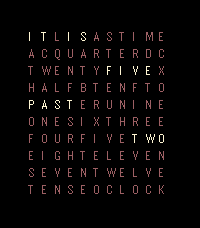
The screenshot from the published watchface. The letters stay in place; the highlighted sentence changes with the time.
How does it work?
The face is a grid of 110 letters: ten rows and eleven columns.
ITLISASTIME
ACQUARTERDC
TWENTYFIVEX
HALFBTENFTO
PASTERUNINE
ONESIXTHREE
FOURFIVETWO
EIGHTELEVEN
SEVENTWELVE
TENSEOCLOCK
If you look closely, you can find the pieces needed to describe the time: IT IS, QUARTER, TWENTY, FIVE, HALF, PAST, TO, and the hours.
Some words appear more than once for a reason. FIVE, for example, can be part of the minutes or the hour. At 5:25, both are needed. The remaining letters fill the gaps and keep the grid visually consistent.
The implementation keeps two things separate: the letters themselves and which cells should be active. The letters are stored as strings, while a matching grid of booleans tracks the highlighted positions. A small mark function activates a range of letters in a row.
That means the time calculation only needs to choose the words. The drawing code handles where they appear and which colour to use.
Five-minute steps, and a small detail about the hour
Word Time shows the time in five-minute steps, rounding down. So 10:25 and 10:29 both display “TWENTY FIVE PAST TEN”.
That is a deliberate trade-off. You lose the exact minute, but the sentence stays short enough to read on a watch.
The part to pay attention to is the change from PAST to TO:
| Time | Display |
|---|---|
| 10:00 | IT IS TEN OCLOCK |
| 10:25 | IT IS TWENTY FIVE PAST TEN |
| 10:30 | IT IS HALF PAST TEN |
| 10:35 | IT IS TWENTY FIVE TO ELEVEN |
| 11:55 | IT IS FIVE TO TWELVE |
Once the phrase uses TO, the hour must move forward as well. It is easy to focus on the minutes and forget that “twenty five to ten” and “twenty five to eleven” describe different times.
These transitions are also useful test cases. Checking a few ordinary times is a start, but half past, the switch to the next hour, and the wrap from twelve to one are where I would concentrate the checks.
Fitting it on the screen
Pebble Time 2 has a 200 × 228 colour display, called emery in the SDK.
With eleven columns, there are only about 18 pixels per column before accounting for the margins. The font, spacing and alignment all need to work within that space. Long words such as QUARTER and TWELVE need to remain readable without making the whole matrix feel cramped.
I kept the inactive letters visible because they are part of the design. However, they need to stay quiet enough for the active sentence to stand out.
The colours help separate the parts of that sentence: the introductory words, the minutes and the hour. There is no additional panel to explain them; the highlighted text is the interface.
This is one of those layouts where a screenshot at the actual display size is much more useful than a large preview on a laptop. Enlarging it makes everything easier to read, including things that might be too small on your wrist.
JavaScript on the watch
For this project I used Alloy JavaScript, with the Moddable runtime and the Poco renderer, rather than writing a C watchface.
The rendering flow is fairly small: calculate the active words, clear the screen, draw the letters and finish the frame. The watchface listens for the minutechange event to update the display.
There is no reason to redraw every second when the face does not show seconds. Even a minute-level update is more frequent than the visible five-minute changes, but it keeps the time handling straightforward.
The current version is self-contained: no network requests, companion service or settings page. That keeps the amount of work it needs to do small. I haven’t measured battery life yet, so I wouldn’t put a number on the benefit.
Building and checking the result
With the Pebble SDK installed and the project configured, the build produces a .pbw package:
cd word-time
pebble build
The project targets emery, so this release is specifically for Pebble Time 2.
To install it in the emulator and capture the display:
pebble install --emulator emery
pebble screenshot --no-open --emulator emery screenshot_emery.png
When finished:
pebble kill --force
The screenshot is useful for more than the store listing. It lets you inspect the outer rows, the space around the grid and the contrast between active and inactive letters.
For anyone building something similar, I’d check both the sentence and the layout. A face can draw perfectly and still highlight the wrong occurrence of TEN or FIVE. Keeping the word selection separate from the renderer makes those problems easier to investigate.
What next?
A Spanish version would be interesting, although it would need more than translating the existing words. The grid would need a different layout, and the time phrases have their own rules: “es la una” and “son las dos”, for example.
Colour themes and an option to dim the inactive letters are other possible additions. For now, the first version stays focused on the English word clock.
If you have a Pebble Time 2, you can install Word Time from the Pebble App Store. I’d be interested to hear how readable you find it on the actual watch, especially the balance between the highlighted words and the background letters.